
The building blocks of Angular Applications consist of Components, Templates, Directives,Pipes, and Services. We build a lot of such blocks to create a complete application. As the application grows bigger in size managing these blocks become difficult. The Angular Provides a nice way to organize these blocks in a simple and effectively using Angular modules (Also known as ngModule).
The Module is an overloaded term. It means different things depending on the context. There are two kinds of modules that exist in Angular itself. One is the JavaScript Module and the other one is Angular Module.
The Angular module (also known as ngModule) helps us to organize the application parts into cohesive blocks of functionality. Each block focuses on providing a specific functionality or a feature.
The Angular module must implement a specific feature. The Components, Directives, Services that implement such a feature, will become part of that Module.
The Modular design helps to keep the Separation of concerns. Keep the features together. Makes it easy to maintain the code. Makes it easier to reuse the code.
The Angular itself is built on the concept of Modules. The @angular/core is the main Angular module, which implements Angular’s core functionality, low-level services, and utilities.
The Features like Forms, HTTP, and Routing are implemented as separate Feature modules such as FormsModule, HttpClientModule, and RouterModule. There are many third-party libraries built around Angular such as Material Design,Ionic, etc.
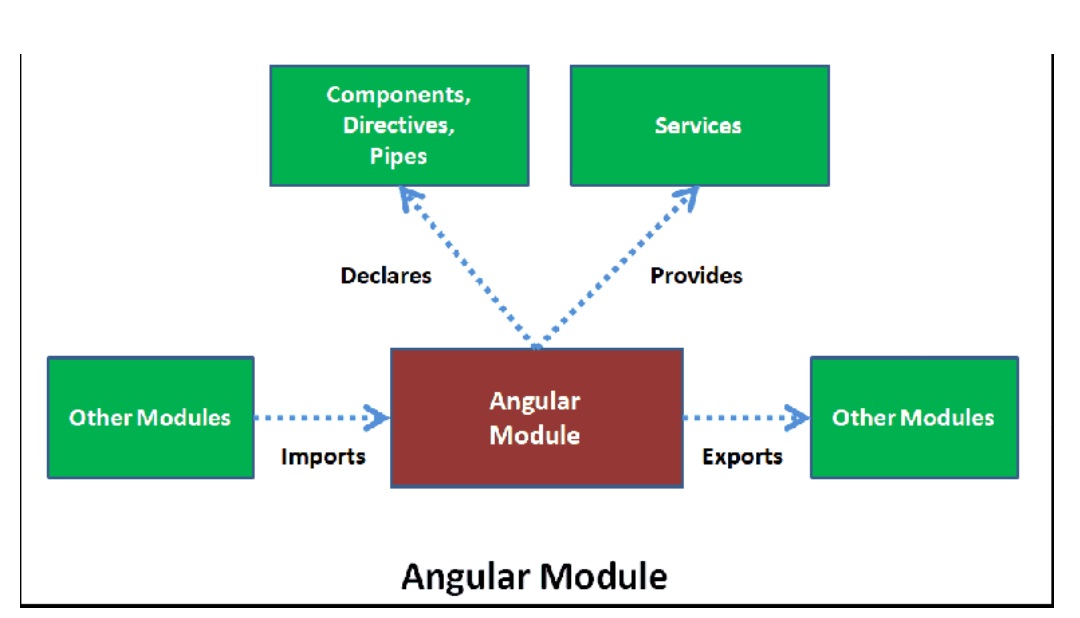
Angular Applications are assembled from the modules. The module exports Component, directive,service, pipe, etc, which can be then imported into another module
The JavaScript Modules, which also go by the name JS modules or ES modules, or ECMAScript modules are part of the JavaScript Language. The JS Modules are stored in a file. There is exactly one module per file and one file per module. These modules contain small units of independent, reusable code. They export a value, which can be imported and used in some other module.
The following is a Javascript Module that exports the SomeComponent.
export class SomeComponent {
   //do something
}
The SomeOtherComponent is another JavaScript Module, that imports and uses the SomeComponent.
import { SomeComponent } from './some.component';

export class SomeOtherComponent {
   /do some other thing
}
The Angular Module must declare the Components,Pipes, and Directives it manages. We Create the Angular Modules by decorating it with the ngModule decorator.
The NgModule() decorator is a function that takes a single metadata object,whose properties describe the module. The most important properties are as follows.
@NgModule({
  declarations: [  ],
  imports:      [  ],
  providers:    [  ],
  exports:      [  ],
  bootstrap:    [  ],
  entrycomponents: [ ]
})
This is where components, directives, and pipes that belong to this NgModule are declared.
You should add only those, which belong to this module. The Component cannot belong to more than one module.
The services must not be declared here. They are defined in the Angular Providers array.
The Services, which you want to add to the global collection of services are added here. The services are then available for injection via dependency injection.
Remember :
Declarations are for Components, Directives & Pipes.
Providers are for Services
Remember:
Services are global in scope. Services added to Providers array are available for injection
in the entire application
If you want this ngModule require any feature or functionality, then those modules need to be imported here. Any components,directives, and pipes that are defined and exported in that module can be used in this module.
If you want other modules to use the components, pipes, directives of this NgModule, then those must be specified here.
Remember:
Only those components declared here are visible to the other ngModules, when
they import this
module.
The main component of this module, which needs to be loaded when the module is loaded is specified here.
This is a must if you are the first module (called the root
module)
that is loaded when the Angular App starts. It is the responsibility of the root module to
load the first view and it is done by specifying the component here.
If the module is not the root module, then you should keep this blank
Suggested Reading
How Angular Bootstraps your Application
The components that are dynamically loaded needs to be declared here.
The components are loaded when angular
If your component is not listed any of the above, then it needs to be declared in EntryComponent so that Angular knows where to find them and compile them.
The following image should make it clear, how the ngModule metadata works
ng new --routing --style css ModuleDemo
Use npm start to run the program and test everything is ok.
Cd ModuleDemo
npm start
The App Contains two Modules. i.e. AppModule & AppRoutingModule
The AppRoutingModule is an Angular Module, which specifically defines the application Routes
import { NgModule } from '@angular/core';
import { Routes, RouterModule } from '@angular/router';

const routes: Routes = [];

@NgModule({
  imports: [RouterModule.forRoot(routes)],
  exports: [RouterModule]
})
export class AppRoutingModule { }
This module does not contain any components, pipes or directives. Hence it does not need to declare anything in the declaration array
No services are part of this Module, Hence providers array is also not needed.
The Angular RouterModule is needed for the routing to work, Hence it is imported. The Routermodule requires the routes to work, hence it is passed to the RouterModule in the forRoot method.
The application needs only one instance of the services provided by
the RouterModule. But every Angular module might contain routes of its own and
needs to import RouterModule and register the routes.
Angular has a nice way to solve this problem. The Services are registered only if you call
the forRoot method. forRoot method must be called only once and in
the Root module. In the other modules, we will be using the forChild method to
register the routes
The first module that gets loaded is called Root Module, which is conventionally named as AppModule and is automatically created by the Angular CLI.
The following is the auto-generated code of the AppModule. The class is decorated with the @NgModule decorator
import { BrowserModule } from '@angular/platform-browser';
import { NgModule } from '@angular/core';

import { AppRoutingModule } from './app-routing.module';
import { AppComponent } from './app.component';

@NgModule({
  declarations: [
    AppComponent
  ],
  imports: [
    BrowserModule,
    AppRoutingModule
  ],
  providers: [],
  bootstrap: [AppComponent]
})
export class AppModule { }
The AppModule has only one component i.e AppComponent and it does not have any pipes or directives. Hence the declaration array contains only AppComponent
The imports metadata should contain the other modules that are being used by this module. Hence it imports the BrowserModule, which is an Angular Library. It also requires Routes, hence we are importing AppRoutingModule
The AppModule does not define any services. Hence the providers array is empty
Finally, we need to load the AppComponent when the App starts, hence we define it in bootstrap array
Let us add another Module to our above application.
Create a folder home under src/app folder
Let us add three components. HomeComponent, AboutUsComponent, ContactUsComponent.
Create a folder called pages under the home folder. Create a three folder under pages aboutus, contactus & home.
home/pages/aboutus/about-us.component.ts
import { Component } from '@angular/core';

@Component({
    templateUrl: './about-us.component.html',
})
export class AboutUsComponent
{
}
<h1> About Us Page</h1>
import { Component } from '@angular/core';

@Component({
    templateUrl: './contact-us.component.html',
})
export class ContactUsComponent
{
}
<h1> Contact Us</h1>
import { Component } from '@angular/core';

@Component({
    templateUrl: './home.component.html',
})
export class HomeComponent
{
}
<h1> Welcome To Module Demo</h1>
export * from './aboutus/about-us.component';
export * from './contactus/contact-us.component';
export * from './home/home.component';
Now, our components are ready, we can now create the HomeModule
Create the home.module.ts under the home folder
import { NgModule } from '@angular/core';
import { RouterModule, Routes } from '@angular/router';
import { CommonModule } from '@angular/common';

import { AboutUsComponent,ContactUsComponent,HomeComponent } from './pages';

const routes: Routes = [
  {   path: '',   component: HomeComponent   },
  {   path: 'home',   component: HomeComponent   },
  {   path: 'contactus',   component: ContactUsComponent   },
  {   path: 'aboutus',   component: AboutUsComponent   },
];

@NgModule({
  declarations: [AboutUsComponent,ContactUsComponent,HomeComponent],
  imports: [
    CommonModule,
    RouterModule.forChild(routes),
  ],
  providers: [],
})
export class HomeModule { }
We decorate the HomeModule class with @NgModule to let Angular know that it is an Angular Module
Next, use the declarations array to declare the three components that we have created.
The HomeModule do not expose any services, hence we keep the providers array empty
We are keeping the Routes in the module itself. You can create a separate routing module similar to the AppRoutingModule. That will help to keep the HomeModule code clean.
HomeModule requires CommonModule hence it is added to the imports array. The RouterModule module is imported and routes are registered with the call to forChild(routes). forChild registered the routes but does not register any services.
home/index.ts
export * from './pages';
export * from './home.module';
The next step is to import the HomeModule in the AppModule. First import the HomeModule
import { HomeModule} from './home';
Next, add HomeModule to the imports metadata of the @ngModule
  imports: [
    BrowserModule,
    AppRoutingModule,
    HomeModule
  ],
Next, we need to use the Components of the HomeModule. Open the app.component.ts and add the following code
<ul>
  <li>
    <a class="navbar-brand" routerLink="/">Home</a>
  </li>
  <li>
      <a class="navbar-brand" routerLink="/aboutus">About</a>
  </li>
  <li>
    <a class="navbar-brand" routerLink="/contactus">Contact</a>
  </li>
</ul>

<router-outlet></router-outlet>
All we have done is to use them routerLink to create a menu item.
Copy the following CSS to app.component.css
ul {
    list-style-type: none;
    margin: 0;
    padding: 0;
    overflow: hidden;
    background-color: #333333;
}

li {
    float: left;
}

li a {
    display: block;
    color: white;
    text-align: center;
    padding: 16px;
    text-decoration: none;
}

li a:hover {
    background-color: #111111;
}
Finally, run the app
In this tutorial, we learned what is Angular Modules are and how to create an Angular Module.
